Customer portal · included on every plan
A customer portal under your laboratory's name
A customer of a laboratory on CalibraWorks? Sign in to its portal.
What it does for your laboratory
Your customers help themselves. You keep the control.
The certificate request answers itself
Every certificate and inspection report you have issued a customer, current and historic, with any amendment shown against the original. They download it, or check it by its verification link, without asking you.
Recall that customers can see
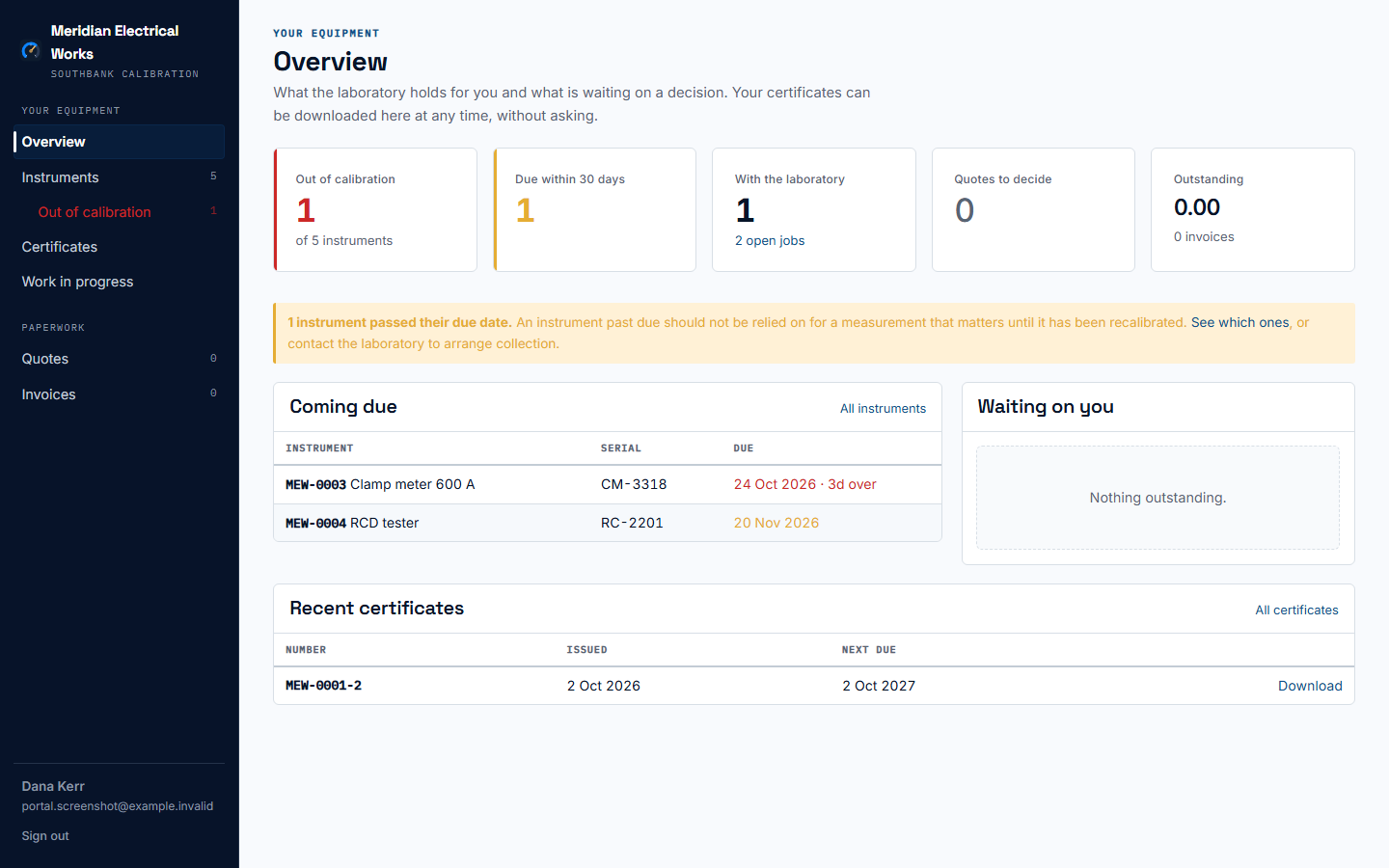
Their overview counts what is out of calibration and what falls due within 30 days, and your monthly recall email links to it. When they want the work done, they ask for a quote from the same portal and it reaches you against their company.
A professional face, in your colours
Your logo, name and colour on every screen, and a sign-in page of your own — the link your invitations and receipts carry. Invitations go out in your letterhead and your wording.
What you control
Eight switches decide what your customers see.
They sit under Setup → Customer portal, all on to start with. Six are enforced by the database: a switched-off section is refused to the customer's session, not just left off the page. Try them.
Setup · Customer portal
illustration · try the switches
You decide
What they see
database: the rows are refused to the customer's session, not just left off the page. screen: a column or a button.
Your customer sees
Meridian Electrical Works
Your laboratory · your logo, your colour
Out of calibration
1
Due within 30 days
1
With the laboratory
2open jobs
Quotes to decide
1
Invoices unpaid
1
PayComing due
| Instrument | Serial | Due |
|---|---|---|
| Clamp meter 600 A | CM-3318 | 3 days over |
| RCD tester | RC-2201 | 20 Nov |
Certificates and reports
| Number | Next due | |
|---|---|---|
| MEW-0001-2 | 2 Oct 2027 | Download · Verify |
| MEW-0007-1 | 14 Aug 2027 | Download · Verify |
Signs in with a one-time code emailed to any contact or accounts address you hold for them. No password.
Who may sign in
To start with, any contact or accounts email address you hold for a customer can sign in, and their portal account is made the first time they do. Switch that off and only the contacts you give access can sign in — the invitation goes out in your letterhead, or not at all if you untick it. Removing one person's access is done from their contact, is recorded, and can be undone. Your own staff's addresses never sign in as customers.
The instrument list, in your words
Which columns the customer's instrument list shows, in what order and under what heading, and what each outcome is called — your laboratory's vocabulary, not ours.
What reaches you
A quote request arrives as a record against the customer's company. A customer who has changed their email uses Changed your email, or can't get in? and the request lands in your list for you to check. A customer who says an instrument is no longer in use changes nothing until you confirm it; then it stops being recalled and keeps its history.
What is never shown
Only what you have issued. No draft, no reading, no result under review, and on work in progress no price and no staff name. A customer sees documents, not the bench.
What a customer can do
The questions they used to phone you with.
Each section answers one, for their own company only, at whatever hour they need it.
Which of our instruments are due?
The overview counts what is out of calibration, what falls due within thirty days and what failed at its last test, and each count opens the matching list. The instrument list searches every word across its columns, filters and sorts, and downloads as CSV — everything that matches, not only the page on screen. The same due dates drive your recall email, so the two never disagree.
Where is the certificate?
Every certificate and inspection report issued to them, current and historic, to download at any time — with any amendment shown against the original, and a link that lets anybody check it.
Where has our equipment got to?
Their open jobs, and where each instrument has got to: received, being worked on, ready to collect.
Is the quote acceptable?
Every quotation you have sent them, to read and accept or decline. Acceptance is recorded against their name and the version they accepted. A purchasing officer with no login can still accept by the link in the email; a customer with one also sees it here, and can ask you for a new quote.
What do we owe?
Every invoice and what each line was for, as a PDF, with the payments received and what is outstanding — the same balance you see. Where you choose, a Pay button opens the invoice's payment page.
How does a customer sign in?
With a six-digit code emailed to the address you hold for them. No password to set or forget. A code works once, for fifteen minutes, and only the newest one is live. The sign-in page answers every address the same way, so it cannot be used to find out who your customers are.
A customer of several laboratories
Somebody who deals with more than one laboratory on CalibraWorks keeps one login, and after signing in chooses which laboratory's portal to open. Each laboratory sees only its own records about them.
Why logins are free
They are the laboratory’s customers, not ours, and there may be hundreds. Charging per portal login would price the feature out of the laboratories that benefit most. A portal login is not a seat; seats are for your own staff. See pricing.
Calibration and Test & Tag, in one portal
Calibration certificates and electrical inspection reports sit side by side in the same customer's portal, each the right kind of document — one system for the laboratory, one place for the customer. For businesses that do both.
The CalibraWorks customer portal lets a laboratory's customers see their instruments and due dates, download every certificate and report, follow work in progress, accept quotes and ask for new ones, and see their invoices — each section switched on or off by the laboratory. Logins are free and never count as users, and verification by QR code works for anybody with no login at all.
Questions about the customer portal
- Do portal logins cost anything?
- No. A customer's login is not a seat and is never charged for, however many customers you give one to. Seats are for the laboratory's own people.
- How does a customer sign in?
- With a six-digit code emailed to an address the laboratory holds for them. There is no password. A code works once, for fifteen minutes. The sign-in page answers every address the same way, so nobody can discover which companies are a laboratory's customers by trying addresses.
- Can I choose what my customers see?
- Yes. Instruments, due dates, certificates and reports, work in progress, invoices, the Pay button, quotations and the quote request form are each a switch, all on to start with. Six of the eight are enforced by the database, so a switched-off section is refused to the customer's session rather than just hidden.
- Do I have to invite every customer?
- No. To start with, any contact or accounts email address you hold for a customer can sign in with a code, and their portal account is made the first time they do. Switch that off and only the contacts you give access can sign in. You can remove one person's access from their contact at any time.
- Can a customer see another customer's instruments?
- No. Every row carries the laboratory and the company it belongs to, and a portal session can read only its own company's records. That is enforced by the database, not by the screen.
- Does the portal carry our branding?
- Yes. Your logo, your name and your colour are on the portal, and you have a sign-in page of your own to send customers to. A laboratory that has chosen no colour gets neutral ink, never CalibraWorks colours: the customer is yours.
- What if a customer deals with more than one laboratory on CalibraWorks?
- They keep one login. After signing in they choose which laboratory's portal to open, and can switch between them. Each laboratory sees only its own records about them.
- Can customers pay an invoice from the portal?
- If you choose. A Pay button on each unpaid invoice opens its payment page: by card where you take cards, otherwise your bank and PayID details. It is one of the switches, so you can leave it off.
- What happens to the portal if the laboratory stops subscribing?
- Certificate verification by QR code never stops, because the person scanning a sticker is not the laboratory's customer and agreed to nothing. The portal itself follows the subscription; the records stay exportable by the laboratory.
Give your customers a portal of their own.
No card, and one trial per organisation. Nothing is deleted when a trial ends — the records are yours and stay readable and exportable.